Task, calendar, and desktop reliability improvements
This release hardens all-tasks search/filtering and triage behavior. It also improves calendar/list view polish, editor stability, and cross-architecture Electron builds.
Added
- Added category selector support for creating one-off routine blocks.
Fixed
- Fixed all-tasks search, filter reload behavior, and pagination consistency.
- Fixed triage regressions, including old do-date clearing behavior.
- Fixed missing label submenu behavior on task context menus.
- Fixed create-task button visibility on container-scoped task index pages.
- Fixed daily review default view behavior to show day-at-a-glance.
- Fixed calendar list view horizontal scrolling and left/right padding issues.
- Fixed saved-view update button behavior.
- Fixed toolbarless editor image behavior.
- Fixed auto-update toast and terminal toggle regressions.
- Fixed nested-document serialization guard in Lexical flow.
- Fixed Electron desktop build reliability, including separate Intel and ARM64 build handling.
Calendar bucket filter reliability
This release resolves calendar bucket filtering behavior.
Fixed
- Fixed calendar bucket filter behavior.
Calendar filter cleanup and submenu fix
This release fixes a duplicated category submenu in calendar filters and removes unused internal artifacts.
Fixed
- Fixed duplicate category submenu behavior in calendar filters.
Changed
- Removed unused planning artifacts.
- Removed unused animation app artifacts.
Task index crash fix
This release resolves a task index page crash regression.
Fixed
- Fixed task index page crash behavior.
CLI triage expansion and task-system hardening
This release adds inbox triage support for CLI task create/update flows. It also improves task assignment/query performance and resolves a broad set of triage, onboarding, and platform regressions.
Added
- Added CLI inbox triage support for task create and update commands.
Fixed
- Fixed assignee selection issues and improved
my tasksquery performance with assignee indexing. - Fixed triage behavior across time-aware logic, do-date auto-triage, integration auto-triage, and general triage flow.
- Fixed org task page hangs and overflow task filtering behavior.
- Fixed API plan-check behavior.
- Fixed daily review generation UX and cron-driven generation flow.
- Fixed onboarding flow by simplifying steps and removing obsolete theme setup.
- Fixed Codex via Linear agent assignment behavior.
- Fixed Electron dialog overlay and refreshed WyrdOS SVG asset behavior.
- Fixed landing task search indexing and all-tasks return behavior.
Favicon refresh and social preview fix
Added
- Added refreshed favicon assets.
Fixed
- Fixed landing Twitter Open Graph metadata.
Agentic review controls and calendar shortcuts
This release adds agentic review settings and improves daily review access from calendar views. It also includes several landing page data and visual fixes.
Added
- Added agentic review settings on web.
- Added daily note and daily review buttons to calendar list view.
Fixed
- Fixed daily review generation reliability.
- Fixed landing page metrics rendering issues.
- Fixed landing mockup rounding and tie-circle positioning.
- Fixed landing Open Graph card updates.
Landing asset repairs and favicon fixes
Fixed
- Fixed missing landing mockups.
- Fixed landing feature-list presentation regressions.
- Fixed favicon issues.
CLI expansion and platform stability fixes
This release broadens CLI filtering and strengthens CLI publishing reliability. It also resolves calendar/filter consistency, WyrdOS sync issues, and API/web regressions.
Added
- Added comprehensive CLI task filters including category, assignee, and date options.
- Added additional CLI filter flags for containers and projects.
Fixed
- Fixed CLI support for routine-block filters, container links, org options, and review step handling.
- Fixed CLI publishing reliability through trusted-publisher/OIDC updates and npm fallback handling.
- Fixed auth-related CLI regression.
- Fixed WyrdOS note sync and endpoint issues.
- Fixed calendar filters and display-config persistence across views.
- Fixed calendar heat chart, list view styling, and header sizing regressions.
- Fixed Linear Codex assignee handling.
- Fixed task API routing to the correct public API and fixed category list endpoint behavior.
- Fixed build and org-id type regressions.
- Fixed Twitter Open Graph metadata behavior.
CLI route fixes, directory support, and docs source bump
Added
- Added CLI support for directories and master pages.
Changed
- Updated docs source wiring.
- Bumped
@wyrdos/clitov0.2.3.
Fixed
- Fixed zones/actions API and CLI routes.
- Fixed landing static build issues around mermaid rendering.
Task date controls and calendar reliability
This release extends task scheduling with end-date support. It also hardens calendar display configs, date selectors, and heat-map interactions.
Added
- Added do end date support on tasks.
Fixed
- Fixed task date-selector and date-value UI regressions.
- Fixed routine-block template linking override behavior from task context menus.
- Fixed calendar view stacking and display-option inconsistencies.
- Fixed calendar heat-map baseline and hover-area behavior.
- Fixed routines page stacking issues.
Planning view and desktop navigation updates
This release expands planning visibility with new view modes and UX polish. It also improves desktop app navigation and routine display stability.
Added
- Added scheduled vs ambient planning view support.
- Added back-button support in the Electron app.
- Added planning-style visual updates.
Fixed
- Fixed routine-block layering regressions.
- Fixed landing mockup type errors.
Task detail and schedule polish
This release refines task-detail controls and scheduling touchpoints. It also tightens workspace and landing presentation consistency.
Fixed
- Fixed task-detail dialog improvements including tag selector and schedule UI behavior.
- Fixed view-compression settings and workspace scroll regressions.
- Fixed stacked template routine-block behavior.
- Fixed landing typography compactness issues.
Seed workflow updates and organisation cleanup
Added
- Added seed feature support.
Changed
- Changed repository hygiene to stop tracking
*.tsbuildinfofiles and ignore them moving forward.
Fixed
- Fixed seed data behavior and a missing workspace settings tab for personal workspaces.
- Fixed organisation deletion flow issues.
Favorites and calendar workflow stabilization
This release introduces new shell/task workflows and improves calendar usability. It also resolves multiple list, sidebar, and rendering stability issues.
Added
- Added favorites support in shell view with persistence.
- Added overflow task tab for better task triage.
- Added task bucket popover and calendar list-view display config support.
Fixed
- Fixed calendar list/week-list task UI and header/filter behavior.
- Fixed calendar sidebar issues including assignee and routine-block filter behavior.
- Fixed saved-views rendering and alignment issues across index and calendar surfaces.
- Fixed shell sidebar context-menu, active/open-state, and hotkey regressions.
- Fixed Electron crash and build-related regressions.
Improved
- Improved calendar rendering performance and interaction responsiveness on dense views.
Landing page redesign pass and pricing polish
Added
- Added a mermaid diagram section to the landing experience.
- Added Menlo typography support in landing styling.
Changed
- Updated landing layout and spacing across hero, header, card sections, CTA, engine mockups, CLI demo, and shell sidebar treatments.
- Updated system demo and AI-native section presentation for clearer narrative flow.
Fixed
- Fixed landing build errors and styling regressions.
- Fixed pricing page card visuals, pricing styling, and feature-list presentation.
- Fixed dark-mode background and mockup sidebar border issues.
Kanban performance and reliability hardening
This release improves large-board responsiveness and task-loading stability. It also fixes onboarding defaults and core navigation reliability.
Added
- Added virtualized kanban rendering for better large-board performance.
Fixed
- Fixed task dialog opening and overflow behavior in kanban workflows.
- Fixed scheduled-at input and task page loading regressions.
- Fixed onboarding overview UI and default wake/sleep time behavior.
- Fixed first-load left-sidebar open state and auth layout loading issues.
Improved
- Improved task and kanban performance through query, render, and drag-drop optimizations.
- Improved backend auth-check and container-scoped task query reliability.
Onboarding visibility and UI polish
Fixed
- Fixed onboarding visibility so onboarding is shown explicitly when expected.
- Fixed onboarding homepage presentation and hover interactions.
- Fixed onboarding settings UI issues.
Onboarding flow polish
This release improves first-run onboarding clarity and setup continuity. It focuses on smoother starter flow guidance and integration visibility.
Fixed
- Fixed onboarding first-page flow issues.
- Fixed onboarding starter cards for clearer progression.
- Fixed Jira visibility in onboarding setup.
Task index and WyrdOS sync stabilization
This release focuses on task-index capability parity and WyrdOS sync correctness. It expands grouping/filtering controls while fixing imported-link and metadata consistency.
Added
- Added task filtering by category and label.
- Added kanban grouping support and create action in board columns.
- Added improved label selector UI and labels support across projects and tasks.
- Added project deletion support that removes contained entities.
Fixed
- Fixed task index columns and display-config inconsistencies for do date and due date.
- Fixed container-scoped and org-scoped task index parity issues via consolidated config behavior.
- Fixed WyrdOS sync pagination and advanced-sync settings behavior.
- Fixed WyrdOS action sync for labels, categories, and synced time values.
- Fixed integration callback and WyrdOS route handling regressions.
- Fixed Jira token-refresh reliability.
- Fixed WyrdOS link-card formatting and related API/CLI support for task links, labels, and categories.
Release Notes
- Electron version bumped to
0.7.0.
Onboarding flow foundation and calendar query cleanup
Added
- Added the initial onboarding flow foundation.
- Added an onboarding cancellation loop path.
Changed
- Refactored the calendar list query for cleaner data access.
Fixed
- Fixed onboarding step flow, checklist actions, and sidebar state highlighting.
WyrdOS hardening and billing correctness
This release hardens WyrdOS integration behavior in production and improves My Tasks productivity. It also addresses multiple billing and seat-count correctness issues.
Added
- Added saved views for My Tasks.
- Added WyrdOS integration environment-example guidance.
Fixed
- Fixed WyrdOS webhook handling, realtime sync, and organisation-scope routing.
- Fixed advanced WyrdOS sync settings behavior.
- Fixed billing auto-checkout and seat-count calculations across personal and org flows.
- Fixed pricing card cadence/cancellation UI and invoice refund visibility.
- Fixed My Tasks saved-view UI regressions.
Billing gates, plan consistency, and OAuth org checks
Fixed
- Fixed OAuth verification to return the correct organisation context.
- Fixed incorrect feature-gate checks across product flows, including API and CLI gate handling.
- Fixed billing seat-count mismatches and missing-meter gate logic.
- Fixed backend billing behavior to prevent users from ending up with multiple plans.
WyrdOS integration launch
This release introduces the initial WyrdOS integration for Monoid. It establishes the base flow for connecting and syncing external actions into task workflows.
Added
- Added initial WyrdOS integration support and sync foundations.
Fixed
- Stabilized initial integration wiring needed for reliable onboarding.
Org billing, auto-update, and desktop navigation
Organisations can manage billing (including annual plans), the desktop app can auto-update, and Electron gains clearer navigation and window title behaviour.
Added
- Added organisation billing with annual billing support and updated pricing card UI.
- Added Electron auto-update and navigation controls (back/forward patterns) aligned with in-app browsing.
- Updated API credential flows alongside the gateway.
Changed
- Refreshed documentation formatting for readability.
Fixed
- Fixed API key permissions, Electron build issues, back button positioning, title bar toggle behaviour, landing build errors, and editor table horizontal overflow.
Recurring tasks and reliability updates
This release introduces recurring tasks and improves reliability in planning and task-detail workflows. It also improves token freshness checks for integration stability.
Added
- Added recurring-task support.
Fixed
- Fixed recurring-task UI behavior.
- Fixed calendar filter behavior for tasks and routine blocks.
- Fixed task-detail context-menu regression.
- Fixed integration token-refresh behavior for Linear.
- Fixed electron settings updates-page manual-check flow.
- Fixed app-wide type-error regressions.
Action statuses, scoped indexes, and CLI types
Actions gain status and time fields; indexes can focus on zones and actions; the CLI learns categories and types with releases through 0.2.2.
Added
- Added action statuses and time fields in the product UI.
- Added a zones and actions scoped index page for focused triage.
- Added types and categories support in the CLI, including create/update links on actions.
Changed
- Bumped the CLI through 0.2.0 → 0.2.2 with iterative fixes.
Fixed
- Fixed CLI login, do-time updates for actions, assignee popover, dialog overlap on selectors, and container tabs plus shell sidebar links.
Filtering, analytics, and billing polish
This release improves index filtering controls, review analytics workflows, and billing presentation. It also includes consistency fixes across settings and charting interfaces.
Added
- Added container-property filtering for scoped index pages.
- Added saved views for review analytics.
- Added annual billing wiring across billing surfaces.
- Updated analytics terminology from Insights to Analytics.
Fixed
- Fixed filter dropdown behavior on container-scoped index pages.
- Fixed chart defaults, ordering, and review panel rendering issues.
- Fixed organisation feature-gate routing in review flows.
- Fixed pricing and settings card UI inconsistencies.
Electron beta bump and calendar pagination
Added
- Improved download from master documents when content is surfaced on pages.
Changed
- Bumped the Electron app version to 0.3.0-beta.1.
Fixed
- Fixed a recurring pagination request error on calendar views that could spam the network.
Teams and permissions foundation
This release introduces teams and project-permission capabilities. It strengthens access-control behavior and improves related UI and feature-gate consistency.
Added
- Added teams index and team-management foundations.
- Added project-permission capabilities.
- Added linking support between teams, projects, and containers.
Fixed
- Fixed permissions index and permissions-section UI issues.
- Fixed inferred-access rendering for container permissions.
- Fixed feature-gating behavior for tasks, projects, and container creation flows.
- Fixed team-member avatar rendering and context-menu regressions.
- Fixed billing loading edge cases in permission-adjacent settings flows.
Analytics and task-planning upgrades
This release improves analytics visibility and day-planning workflows while expanding agent support. It also adds profile management and multiple UX fixes across index and calendar experiences.
Added
- Added profile page support.
- Added task completion heat-map analytics.
- Added routine-block link visibility on the tasks index.
- Added hotkey to toggle calendar and list views.
- Added OpenClaw agent support.
Fixed
- Fixed org-switch behavior and loading-overlay pagination issues.
- Fixed project index column ordering and added category-column support consistency.
- Fixed heatmap/tooltip/chart rendering behavior in analytics.
- Fixed day-view affordances and tooltip reliability.
- Fixed routine-block ordering issues.
CLI v0.1.7 and master page API
Added
- Added master page support across the API and CLI for long-form document workflows.
Changed
- Released CLI v0.1.7.
Fixed
- Fixed pagination in list commands and cleaned up container list output.
- Fixed a zone type error in typings.
- Removed an unnecessary base URL prompt during CLI login when defaults suffice.
Terminal and calendar quality release
This release delivers the first full terminal experience and adds saved views for calendar workflows. It also addresses runtime stability and interaction issues across the app.
Added
- Added terminal mode with settings and interaction support.
- Added saved views for calendar.
- Added deep-link support improvements for workflow navigation.
Fixed
- Fixed terminal scrolling and hotkey handling issues.
- Fixed build and type-error regressions.
- Fixed calendar saved-view reliability issues.
- Fixed multiple UI/legibility polish issues across key surfaces.
Org billing and integration expansion
This release introduces organisation billing and expands integrations across agent and planning workflows. It also improves editor capabilities and fixes key calendar and UI regressions.
Added
- Added organisation billing flows and related settings support.
- Added Codex cloud delegation and Codex agent support in web.
- Added Jira integration support and integration card plumbing.
- Added editor image uploads and Excalidraw embed support.
- Added "open in Ghostty" workflow support.
Fixed
- Fixed billing feature-gate behavior and settings-sidebar issues.
- Fixed calendar header behavior on mobile and day-list tooltip behavior.
- Fixed integration card UI consistency and GitHub description formatting.
- Fixed Excalidraw theme and embed rendering issues.
- Fixed repeated task-note save behavior and missing import regressions.
CLI npm releases and org-scoped fixes
The @wyrdos/cli package moves through 0.1.2–0.1.6 on npm with clearer auth, base URLs, and publishing automation.
Added
- Simplified the npm publish workflow for
@wyrdos/cli.
Changed
- Bumped CLI versions through 0.1.2 → 0.1.6 with incremental fixes (see commit history for each drop).
Fixed
- Fixed HTTPS org scoping in web/API flows.
- Fixed CLI organisation auto-selection, dev vs prod API keys, base URL defaults when replacing auth keys, and JSON import attributes for modern Node.
- Fixed API key generation in the web app, Zod version alignment, Excalidraw embed regressions and dark mode, and removed a broken funding dialog.
- Fixed repeated build errors from the above churn.
Cloud-agent task assignment with Cursor
This release focuses on a major cloud-agent workflow: assign tasks to agents with Cursor support. Tasks can now run immediately through the assigned agent or run later when the routine block is scheduled.
Added
- Added task assignment to cloud agents, including agent sections in assignee pickers.
- Added Cursor agent support through integration settings and API connection flows.
- Added two execution modes for assigned agent tasks:
- Immediate run mode to start and complete as soon as assigned.
- Scheduled run mode to execute when the routine block is scheduled.
- Added CLI package release progression through
0.1.6to0.1.11.
Fixed
- Fixed missing-task and status issues in calendar views.
- Fixed calendar sidebar auto-filter behavior.
- Fixed redundant assignee-dialog sections and personal-task owner-area visibility.
- Fixed shell-sidebar ordering/duplicate-link issues and broken settings detail links.
- Fixed revoked API-key visibility and agent-assignee update behavior.
- Fixed CLI list-command failures and related type issues.
Docked terminal and Excalidraw embeds
The desktop app gains a dockable terminal and Excalidraw embeds, alongside a wave of Electron and editor polish.
Added
- Added an Electron terminal with docking, resize handle, and header controls.
- Added Excalidraw embed support in documents.
Changed
- Maximised the Electron window on load for a fuller desktop experience.
Fixed
- Fixed Electron dialog overlay, cut-off detail sidebar, disappearing fixed header, and grid card title truncation.
- Fixed terminal padding, tab spacing, hotkeys, sidebar overlap, and rendering glitches.
- Fixed editor separator and horizontal-rule plugin behaviour; card grid creator extra lines and layout under the grid.
- Fixed title wrapping on multi-line headings in the shell.
Calendar sorting and shell consistency updates
This release focuses on Calendar sorting improvements and sidebar/task-link consistency fixes. This improves scan order in day planning and keeps external-link routing behavior more coherent.
Added
- Added day-list sorting support.
- Added merged sidebar and visible-task-id handling for external links.
Fixed
- Fixed sorting behavior in full-page calendar drawer.
- Fixed assignment placement in full-page calendar drawer left-column layout.
- Fixed daily review reminder visibility issues.
CLI publishing and permissions updates
This release focuses on CLI publishing workflow improvements and routine-block edit permission fix. This improves release automation and prevents invalid edits from non-owner contexts.
Added
- Added CLI publish configuration and dynamic version wiring from package metadata.
- Added npm publishing workflow improvements, including dependency install/build/publish pipeline updates.
- Added login-prompt handling improvements for publishing flows.
Fixed
- Fixed routine-block edit errors for non-owner scenarios.
Documentation cleanup
This release focuses on Documentation cleanup for duplicated content. This reduces confusion and keeps reference material more consistent.
Fixed
- Fixed duplicated documentation content in CLI docs.
API-driven CLI documentation
Changed
- Regenerated CLI documentation from the API codegen pipeline so command references stay aligned with the live REST surface.
Calendar and inbox reliability updates
This release focuses on Calendar full-page assignment updates, inbox persistence, and kanban assignee fixes. This improves planning flow continuity and reduces assignment friction across views.
Added
- Added calendar week list view.
- Added inbox filter persistence.
- Added review reminder toast support.
Fixed
- Fixed calendar drawer full-page assignee drag-and-drop behavior.
- Fixed fallback behavior when full-page calendar has no assignable tasks.
- Fixed container-scoped kanban assignee handling.
- Fixed inbox header/icon and scoped breadcrumb redirect behavior.
- Fixed review reminder UI issues.
- Fixed Electron external opening behavior for Linear links.
CLI navigation and reliability updates
This release focuses on Expanded CLI task navigation, auth fallback handling, and command reliability updates. This makes day/week task operations more complete and improves resilience across host config setups.
Added
- Added richer CLI task navigation with expanded week/day detail support.
Fixed
- Fixed CLI command update issues and host-config fallback behavior.
- Fixed CLI/backend flow regressions and related web build issues.
CLI zones, actions, and Lexical reading
The CLI aligns with the product model (zones and actions instead of legacy projects) and can read Lexical page content before agents write.
Added
- Added zones and actions support in the CLI; removed deprecated project-oriented commands.
- Added Lexical helpers for richer structured content (including tables).
- Added agent prompt wiring and mutations for automated edits.
Fixed
- Fixed CLI reads of Lexical page content so agents can inspect state safely.
- Removed daily notes commands that no longer match the product.
CLI REPL, prompts, and navigation
The CLI is smoother for humans: guided prompts, a REPL mode, and clearer routes between sections, engines, and pipelines.
Added
- Added interactive prompts for REST commands while keeping a fast
--datapath for scripts. - Improved REPL mode and navigator flow (landing at
/, chooser at/sections, engines → pipelines → pages) with README notes.
Fixed
- Fixed API layout issues affecting the CLI consumer.
- Restored API commands with better empty-state and network-error UX and clearer startup help.
Kanban and review workflow refinements
This release focuses on Kanban card polish, review-tab enhancements, and calendar drawer fixes. This improves board readability and reduces friction in review and unscheduled-task workflows.
Added
- Added a week-at-a-glance review tab.
- Added a kanban board option for container-scoped task pages.
Fixed
- Fixed kanban task-card styling and badge display behavior.
- Fixed shell-sidebar active link state.
- Fixed routine-block note save and resize behavior.
- Fixed calendar drawer task horizontal scroll handling.
- Fixed filtering of already linked tasks in unscheduled completed sections.
- Fixed waitlist note behavior.
WyrdOS CLI and product analytics
Ship automation from the terminal with the WyrdOS CLI, while the team instruments core flows with PostHog and publishes generated CLI documentation.
Added
- Shipped the
wyrdosnpm CLI with REST and agent-oriented commands (pages, engines, and related APIs). - Added PostHog for event tracking with server-side capture and internal analytic documentation.
- Added a generated WyrdOS CLI section to the docs site.
Routine-block, desktop, and CLI improvements
This release focuses on Routine-block full-screen improvements, Electron updater, and CLI usability fixes. This stabilizes calendar/task editing flows while improving desktop update visibility and CLI onboarding.
Added
- Added Electron updater and update toast notifications.
- Added copy-markdown action support.
- Added hotkey support for creating tasks linked to routine blocks.
- Added CLI landing flow when running the Monoid CLI.
- Added waitlist form and tagging enhancements.
Fixed
- Fixed full-screen routine-block and drawer behavior regressions.
- Fixed calendar drawer sorting, lag, task display config, and horizontal scrolling issues.
- Fixed command-enter new-line side effects and focus-outline problems.
- Fixed task status sync and Linear token/status-update reliability issues.
- Fixed CLI global
--tokenand--base-urlpropagation to nested commands.
Tracking and completion reliability updates
This release focuses on Landing analytics and task-completion tracking reliability improvements. This improves measurement quality and consistency across signup and task lifecycle flows.
Added
- Added landing analytics instrumentation.
- Added expanded team and waitlist tracking coverage.
Fixed
- Fixed task completion timestamp updates.
- Fixed subscription-tracking reliability issues.
Command-K launcher and selector fixes
Jump anywhere with Command-K, with width and autocomplete polish; category pickers behave on Chromium.
Added
- Added a Command-K launcher for quick navigation and actions.
Fixed
- Fixed command launcher width, tab autocomplete in the editor, and drag-handle alignment on reorderable UI.
- Fixed category selector rendering on Chromium-based browsers.
- Made type seed data idempotent so repeated setups do not conflict.
Open tasks directly in local agents
This release focuses on a major local-agent workflow: opening tasks directly in local agents. This makes handoff from task planning to agent execution faster with fewer manual steps.
Added
- Added direct-open task support for local agents.
- Added agent deeplink v1 and deeplink preferences for local agent routing.
- Added agent-focused hotkeys.
- Added maximize-window support in Electron.
Fixed
- Fixed agent icon rendering issues.
- Fixed integration icon styling in dark mode.
Pages query payload trim
Fixed
- Stopped returning full document bodies in the pages query where only metadata was needed, reducing load and latency.
Inbox and calendar interaction updates
This release focuses on Inbox column view, task status visuals, and calendar hotkey polish. This improves inbox readability and smooths core editing and navigation behavior.
Added
- Added inbox column view.
- Added colorized task status icons.
- Added hotkeys for calendar drawer task configuration.
- Added star-task support.
Fixed
- Fixed inbox task-row layout and vertical scrolling in inbox columns.
- Fixed task title multiline editing behavior.
- Fixed project selector scrolling.
- Fixed day-view UI inconsistencies.
- Fixed inbox local-state persistence behavior.
Saved views, resizable sidebars, and editor highlight
Tailor your workspace layout and save index filters; the editor gets a focused highlight mode and steadier card grids.
Added
- Added saved views so favourite filters and layouts persist.
- Added resizable sidebars for more room where you need it.
- Added highlight mode in the editor for emphasis without leaving the doc.
Fixed
- Fixed mdly card grid resize behaviour after deleting a card.
- Fixed fixed-header text sizing and hotkey highlighting conflicts.
Persistence and routine-block enhancements
This release focuses on Task creation persistence, routine-block tools, and analytics tracking updates. This reduces accidental task loss and expands task operations directly from routine contexts.
Added
- Added persistence for accidental task-create close and create-task hotkey flows.
- Added selector hotkeys and routine-block navigation arrows.
- Added routine-block context-menu actions, including unlink task and extra properties.
- Added external links section on task detail panels.
- Added user and onboarding analytics tracking coverage.
Fixed
- Fixed stacked routine-block drop behavior.
- Fixed missing hide-linked-tasks filter in the right sidebar.
- Fixed Linear manual-link and create-task payload issues.
- Fixed redundant calendar-sidebar visibility controls.
- Fixed Google auth account-selection behavior.
Landing branch merge
Changed
- Merged the landing updates branch into main (integration PR), aligning marketing pages with the 12 March landing work.
Calendar sidebar and routine workflow upgrades
This release focuses on Calendar sidebars, command launcher, and routine-block interaction improvements. This improves day-planning control and makes task triage and scheduling workflows more stable.
Added
- Added resizable calendar sidebars for more flexible workspace layout.
- Added a command launcher for faster access to actions.
- Added new calendar sidebars and an event toggle for clearer planning views.
- Added triage and assignee actions in task views, including task-list assignee click support.
- Added routine template ghost toggle and template controls in dialog flows.
Fixed
- Fixed routine-block drag/stack interaction issues, including template interaction conflicts.
- Fixed day-list and task-list UI/data consistency issues.
- Fixed calendar header/button/icon polish and day-view spacing regressions.
- Fixed Linear task creation status mapping and related task creation payload behavior.
- Fixed mobile stack behavior in calendar drawer.
Master documents and landing repositioning
Master documents consolidate long-form strategy work; containers gain a Pages tab; the landing site reflects WyrdOS positioning.
Added
- Added master documents with templates, settings UI, and creation flows from the shell.
- Added copy and export for documents when you need a portable snapshot.
- Added a Pages tab on containers and improved container page styling and routing (container tag preserved in nav).
Changed
- Repositioned and rewrote landing copy for clearer WyrdOS positioning.
- Migrated legacy design-doc and GTM content toward the master-document model.
Fixed
- Fixed Zod errors, document sidebar UI, one-off master documents, blank master submenu, shell sidebar button styling, default star colour, and mdly paste behaviour for paragraphs and tables.
- Fixed shell sidebar active tab highlighting.
Calendar assignee management updates
This release focuses on Calendar drawer assignee popover and full-page assignee reliability fixes. This makes ownership changes faster from calendar workflows and improves assignee visibility.
Added
- Added an assignee popover in the calendar drawer, to make ownership changes faster without leaving the planning view.
Fixed
- Fixed assignee refresh and update behavior in calendar drawer flows.
- Fixed full-page calendar drawer views so all assignees display correctly.
Container pages, card grid editor, and calendar badges
Pages feel more connected to containers, the editor gains a card grid block, and the month calendar surfaces zone context inline.
Added
- Added container chooser flows and linked pages in the container sidebar; containers appear on the pages index.
- Added a card grid creator block in the editor with improved editing and mentions inside grids.
- Added zone badges on the month calendar view.
Fixed
- Fixed container view state, calendar refresh after mutations, dialog overlay stacking, grid title truncation, sidebar tab order, and a build error.
Landing and sidebar fixes
This release focuses on Landing-page workspace fix and shell sidebar polish. This reduces presentation inconsistencies across entry points and shell navigation.
Fixed
- Fixed missing workspace information in landing-page feature sections.
- Fixed icon ordering in the minimised shell sidebar, to make the compact navigation state more consistent.
REST API gateway and Electron hardening
Automate Wyrdos with a documented REST API and API keys, while the desktop app moves toward production-ready signing and polish.
Added
- Added a REST API gateway with bearer authentication, OpenAPI specification, and API key management in the product.
- Added macOS notarisation support for the Electron build pipeline.
Fixed
- Fixed Electron login, header chrome, and app icon presentation.
- Fixed Next/API environment wiring and type errors across API gateway queries and HTTP handlers.
- Fixed a build error from the integration work.
Notifications and editor-mention improvements
This release focuses on Notifications, better editor mentions, and review/table usability fixes. This brings clearer collaboration signals and smoother navigation through linked work.
Added
- Added a notification table for reviewing updates in one place.
- Added entity icons and user avatars on editor mentions, to make references easier to identify while writing.
- Added sortable headers for Linear and Git tables, to improve scanning in review workflows.
Fixed
- Fixed user mention behavior and entity-icon rendering inside the editor.
- Fixed review task filtering and insights time-filter utility issues.
- Fixed editor styling and a set of build errors.
Org-wide calendar and clearer iCal titles
See work across the organisation in one calendar, and recognise containers instantly in subscribed feeds.
Added
- Added an org-wide calendar page under pipelines with a sidebar link.
Changed
- iCal exports and month/week views now include the container name alongside the zone title for context.
GitHub, review embeds, and task-action upgrades
This release focuses on GitHub integration, richer review embeds, and faster task creation and reassignment. This gives reviews more useful context and makes task management quicker across large lists.
Added
- Added GitHub integration and GitHub embed filters, to bring repository context directly into review workflows.
- Added richer Linear embeds on reviews with filters and extra metadata, to make linked work easier to scan.
- Added task relationships, universal task creation, click-to-reassign behavior, and more sorting options across task index views.
Changed
- Improved assignee avatars and reassignment flows, to make ownership changes quicker and easier to verify.
Fixed
- Fixed optimistic assignee updates, inbox triage animation, leftover empty rows after triage, and shell sidebar icon-state issues.
- Fixed build and import issues affecting integrations and the
mdlypackage.
Goal outcomes quarters
Fixed
- Fixed errors when working with goal outcomes across quarter boundaries.
Inbox, reviews, and Electron workflow updates
This release focuses on Inbox triage, review daily notes, insights filters, and Electron sign-in fixes. This makes incoming work faster to sort, brings stronger review context, and gives the desktop app a more reliable sign-in flow.
Added
- Added inbox triage, inbox display configuration, and richer inbox row controls, to make intake and sorting faster.
- Added daily notes tabs to daily and weekly reviews plus edited-state indicators, to bring more planning context into reviews.
- Added chart configuration, improved insights filters, assignee and status icons in filter menus, container-based index pages, and Open Graph cards for the web app.
- Added calendar daily-view sidebar toggles, copy-to-clipboard for Linear issue IDs, and auto-updating task titles when linked Linear titles change.
Changed
- Improved review-step ordering and moved the editor stack onto
mdly, to support a more consistent writing and review experience. - Improved Electron sign-in by moving more of the flow in-app instead of relying on external routing.
Fixed
- Fixed review insights date-range filtering, triage refresh behavior, calendar sidebar search loading, and day-view sidebar animation issues.
- Fixed editor drag-block behavior, collapsible container behavior in the sidebar, and several Electron issues including auth callback routing, title-bar errors, drag-bar handling, and build env configuration.
- Fixed sign-in redirects and added a direct link back to the sign-in page when needed.
Calendar interactions and sharing fixes
Calendar editing feels lighter: right-click menus, dialogs without heavy overlays, and a month view that reads in clear zone lanes.
Added
- Added context menus on calendar zones and actions; edit dialogs open above the menu without a blocking modal overlay.
- Refined month calendar layout: zones flow in lanes by row without noisy dividers.
- When creating an action, zones are limited to the day and a single zone auto-selects when only one applies.
Fixed
- Fixed action and zone edit dialogs and Convex container permissions for org-wide shared containers.
- Fixed shell sidebar visibility for org-shared containers and removed misleading “shared” badges on internal org containers.
- Fixed external sharing copy and switch UI, reformatted org settings, and restored the workspace detail tab on the settings sidebar.
- Fixed recursive section splitting and oversized sections when pasting markdown into long documents.
Kanban actions and workflow fixes
This release focuses on Kanban context menus and review/calendar reliability fixes. This enables quicker task actions and reduces interruptions in review and calendar workflows.
Added
- Added context menus on task kanban cards, to speed up common task actions without leaving the board.
Fixed
- Fixed review cadence settings so saved review schedules behave more predictably.
- Fixed task context menu issues and broken task links to ritual blocks.
- Fixed Linear webhook assignee behavior on first sync and organisation review visibility in calendar flows.
Sharing, Linear, container inbox, and calendar filters
Share containers with teammates, hook up Linear, and stay oriented with calendar filters, tooltips, and a distraction-free container inbox.
Added
- Added container sharing with org members, including search and member avatars.
- Added org gating so features respect organisation membership.
- Added Linear integration (Integrations tab under Categories; workspace block removed from the sidebar where redundant).
- Added a Container Inbox tab with a full-page, toolbarless editor for capture.
- Added calendar filters for zones and actions, with persisted filter and display configuration.
- Added group-by container options for zones, entity icons on grouping headers, and a sortable container sidebar.
- Added relative rendering for do and due dates, two-week week view, today highlighting on the month grid, and tooltips for calendar events (including overflow stacks).
- Added delete action support where the workflow allows removal.
Changed
- Refactored calendar UI into dedicated view, header, and dialog components.
Fixed
- Fixed action detail sidebar, labels and category selectors on actions, and calendar filter typing.
- Fixed container shell sidebar padding, collapsible animation, org scoping on the detail page, and shared-collapsible behaviour.
- Fixed timezone normalisation when creating actions, date selectors, and several Zod validation errors.
- Fixed viewer-page edit UI and default share-configuration presentation.
Faster lists, filters, and homepage loading
This release focuses on List and homepage performance upgrades with persistent filters and cleaner task loading. This means faster navigation across larger workspaces and less repeated loading in task-heavy views.
Added
- Added persistent filters on review tables and task index pages, to keep repeated workflows stable across sessions.
- Added lighter task list queries, lazy-loaded drawer data, deduped external-link fetching, and broader search beyond task pagination.
Changed
- Improved list and homepage performance with virtualised rows, better initial-load behavior, reduced duplicate calls, narrower query windows, and fewer unnecessary external-link requests.
- Improved backend cleanup around task-link deletion and entity-link cascade behavior, to keep linked data more consistent over time.
- Improved index-page interactions with cleaner grouping behavior and a higher-priority toggle placement.
Fixed
- Fixed assignee loading with tasks, raw subgroup status labels, sticky subgroup headers, and index-list animation issues.
- Fixed several calendar and daily-note regressions, including the header progress bar, return navigation glitch, routine-block template dates, and overlapping daily-note visuals.
- Fixed waitlist URL and waitlist page border issues across landing and web surfaces.
Container calendar, zones and actions, and doc sections
This release centres on time and containers: a full calendar experience for zones and actions, subscription-friendly exports, and long documents split into durable sections.
Added
- Added a dedicated container calendar page with sidebar and tab navigation.
- Added calendar list views and pop-up workflows for zones and actions.
- Added calendar views on index pages and an iCal subscription link for external calendars.
- Added repeated actions, start/end dates on zones, and category plus labels on actions.
- Added zone and action edit dialogs directly from the calendar surface.
- Added hero image upload for containers via presigned S3 URLs with full-width display.
- Added create container from the shell sidebar and tooltips on property selectors.
- Wired design docs and GTM docs to internal sections for read/write in smaller chunks.
Changed
- Updated labels to use a tag icon for quicker visual scanning.
- Normalised context menu item order and icon styling.
- Reduced document segment size and added partial reads on editors to avoid large payload spikes.
- Optimised GTM and design-doc previews and metadata updates.
Fixed
- Fixed calendar index view, month-calendar borders, and expand behaviour on calendar dialogs.
- Fixed date selector, selector scroll, and focus ring styling on selectors.
- Fixed Clerk middleware behaviour for the calendar subscription route.
- Fixed design-doc and GTM selectors, document migration patches, and org template visibility.
- Fixed settings shell sidebar overflow, centred auth switcher when the sidebar is minimised, and added an auth affordance in settings.
- Fixed funding dialog typing issues and duplicate calendar buttons.
Task-planning depth and performance groundwork
This release focuses on Fullscreen calendar task list, do dates, and task-loading performance groundwork. This gives you clearer scheduling, faster large-task views, and more dependable shared planning flows.
Added
- Added do dates for tasks, unfinished-task backlog visibility, and organisation selectors in more creation flows, to improve scheduling control.
- Added a fullscreen task-list experience from the calendar, member filtering in the calendar sidebar, and controls for hiding linked tasks.
- Added stronger assignee controls for shared routine blocks by limiting options to relevant members.
Changed
- Improved task loading with paged frontend loading, deferred secondary data, backend paging foundations, and database/indexing work for larger datasets.
- Improved project and kanban presentation with updated task cards, project views, and better routine-block template descriptions.
Fixed
- Fixed webhook behavior after pagination changes and several build errors introduced during the performance refactor.
- Fixed calendar drawer editing, enlarged-view assignee updates, routine header sizing, and drag interactions in the enlarged task view.
- Fixed auto-assignment edge cases for private and org-scoped routine blocks, plus a weather-related error.
Calendar drawer and task-linking upgrades
This release focuses on Calendar drawer persistence, routine-block linking, and index workflow upgrades. This brings smoother day planning, more reliable drag-and-drop, and faster task organisation.
Added
- Added kanban layouts on index pages, sticky list headers, and in-context project creation from container detail pages, to speed up planning and triage.
- Added task linking and unlinking with routine blocks from task detail and calendar workflows, to make schedule management easier.
- Added calendar task creation on click and delete-container controls in integration settings.
Changed
- Improved calendar sidebar settings and filter persistence, including restoring saved filter state when closing the routine drawer.
- Improved routine-block interactions by auto-applying relevant sidebar filters when opening work from the calendar.
Fixed
- Fixed calendar drag-and-drop behavior across ghost overlays, bucket moves, scrolling, and shared block updates.
- Fixed review-opening, routine-block rendering, and calendar visibility issues so full task sets and the expected review context show up consistently.
- Fixed several day-view UI issues, including block name visibility, date-number layering, and daily-schedule border styling.
Editor on mdly
The in-app editor now runs on mdly, setting up richer markdown and block editing going forward.
Added
- Migrated the editor stack to mdly.
Changed
- Synced workspace setup and
pnpm-lock.yamlwithpackages/uidependency changes.
Linear sync and task visibility updates
This release focuses on Linear assignee sync, resync controls, and org-wide task visibility. This makes task ownership more trustworthy and reduces gaps between external tools and MONOid.
Added
- Added Linear-to-MONOid assignee mapping and manual resync controls in settings, to keep imported task ownership current with less manual cleanup.
Changed
- Improved inbox and calendar sidebar task sourcing so organisation work appears beyond tasks you created personally.
Fixed
- Fixed assignee updates from Linear webhooks and personal integration edge cases, to reduce stale ownership state after syncs.
- Fixed shell sidebar active-tab highlighting, to make navigation state clearer.
- Fixed visibility for tasks not assigned to you, to make shared work easier to review.
Containers, funding UI, and index persistence
Container overview and funding views improve; homepage grids align with the index grid; index layout preferences stick across sessions.
Added
- Added stacks to container pages and container context menus.
- Persisted index display configuration so your preferred columns and layout return on reload.
- Added deletion flows for design docs and GTM docs when you no longer need them.
Changed
- Updated the funding detail page UI for clearer status and metadata.
- Updated the container overview page and homepage grids to use the shared index grid experience.
- Updated shell layout and enabled horizontal scroll on list views where content overflows.
Fixed
- Fixed editor bullet outdent behaviour in nested lists.
- Fixed funding context menu actions.
- Fixed design-doc and GTM document templates.
- Fixed container date picker widths.
- Fixed sticky table headers so column labels stay visible while scrolling.
Reviews, list workflows, and calendar UX upgrades
This release focuses on Review expansion, calendar/list productivity upgrades, and landing hero polish. This brings faster review operations, better task visibility, and smoother daily planning flows.
Added
- Added review insights, org-scoped review viewing, org response actions, and container tab workflows on the review page.
- Added list view plus new task buckets (
newandthis week) for improved triage. - Added calendar enhancements: display config, in-progress drawer status, group-by routine block dates, and autoscroll to current time.
- Added Linear completed-time sync and org selector support in the container dialog.
Changed
- Improved landing hero wrapper and mockup/kanban visuals.
- Improved status iconography (
in reviewandin progress) and progress-bar color treatment.
Fixed
- Fixed calendar and sidebar regressions, including small-screen header behavior, sidebar header styling, and sidebar task drag-and-drop to calendar.
- Fixed overlapping routine-block time rendering.
- Fixed chart tooltip UI, multi-selector logic issues, and layout border inconsistencies.
Actions, stacks import, and settings clarity
Actions land as a first-class workflow primitive, stacks can be bootstrapped from CSV, and settings explain entities more clearly.
Added
- Added Actions for trackable work alongside existing planning objects.
- Added CSV import for stacks to migrate or bulk-create stack data.
- Added design-doc and go-to-market doc surfaces in the product.
- Added a setting template editor for reusable configuration patterns.
- Reworked settings structure so entity types are easier to understand.
- Refreshed category modals for clearer create and edit flows.
Fixed
- Fixed the floating toolbar overlapping editor column content.
- Fixed a hotkey clash between bold formatting and the sidebar shortcut.
- Fixed personal space scoping so private data stays scoped correctly.
Changed
- Removed noisy token logging from development paths.
Task scheduling updates
This release focuses on Task due dates for clearer scheduling. This brings clearer execution timelines and prioritization.
Added
- Added due dates for tasks, to improve prioritization and schedule clarity.
Landing and calendar workflow updates
This release focuses on Landing refresh and calendar/task workflow improvements. This brings clearer product messaging and faster day-view planning.
Added
- Added waitlist access for early product signups.
- Added assignee context in task detail and calendar sidebars (including assignee filters and indicators), to speed up routing and ownership.
- Added routine-block to task auto-assignment behavior, to reduce manual triage.
Changed
- Improved landing copy, section structure, trust bar treatment, and dark-mode styling across hero and solution sections.
- Improved calendar sidebar filter/display layout and daily completion visibility in day view.
Fixed
- Fixed day-view routine-block drag and drop behavior.
- Fixed organization/assignee filter edge cases and related filter styling inconsistencies.
- Fixed add-to-block task opening bug.
Review-depth and API-reference updates
This release focuses on Deep review UX, schedule editing, and API-reference tooling. This brings faster planning, clearer reviews, and less back-and-forth between app surfaces.
Added
- Added linked-entity stats in navigation, lists, and dialogs.
- Added week-view schedule block editing in Routines and Week view, to simplify weekly planning and cross-screen adjustments.
Changed
- Improved review UI (steps/checkboxes/icons) in Reviews, to complete reviews faster with better context.
- Improved calendar density controls in Calendar, to simplify weekly planning and cross-screen adjustments.
- Improved docs code-block presentation in the landing site and docs, to improve setup clarity and product understanding.
Fixed
- Fixed integration consent/permission issues and multiple calendar drawer/routine-editing regressions in Routines and Week view, to improve week-planning reliability.
Reviews, organisation context, and sync improvements
This release focuses on Org-aware reviews, Linear sync expansion, and calendar/routine polish. This brings faster planning, clearer reviews, and less back-and-forth between app surfaces.
Added
- Added org grouping context in task creation and task detail, to improve triage and organization speed.
- Added faster integration sync behavior in integrations, to keep external tools in sync with less manual effort.
Changed
- Improved shared planning context via memberships in workspace settings.
- Improved breadcrumbs in navigation, lists, and dialogs.
- Improved clearer org-aware displays in navigation, lists, and dialogs.
Fixed
- Fixed routine-block category/organisation update issues and calendar/routine friction points in Routines and Week view, to improve week-planning reliability.
Full onboarding rollout
This release focuses on Full onboarding flow shipped with UX stabilization. This gets you from sign-in to a usable workspace with fewer blockers.
Added
- Added integration onboarding flows in sign-in and onboarding, to keep external tools in sync with less manual effort.
Changed
- Improved onboarding progression clarity in sign-in and onboarding, to get from sign-in to productive work faster.
- Improved loading stability in navigation, lists, and dialogs.
- Improved final completion feedback in navigation, lists, and dialogs.
Fixed
- Fixed onboarding UX edge cases including spacing/cards and loading stalls in sign-in and onboarding, to reduce sign-in and setup blockers.
Index grid, mentions, and homepage refresh
Indexes gain subgrouping and a grid layout; the editor supports @mentions; the homepage and tables look sharper.
Added
- Added subgrouping for indexes so related items stay grouped at a glance.
- Added an index grid page alongside list-style views.
- Added category inline create from index workflows.
- Added editor mentions across entities.
- Added a notes section on the homepage and a compact index header.
Changed
- Linked principles to goal outcomes for clearer planning hierarchy.
- Centralised detail page layout and sidebar styling for consistency.
- Replaced native date pickers with the shared design-system flow.
- Updated homepage layout and refreshed badge styling on tables.
Fixed
- Fixed build errors from the above refactors.
- Fixed category and subcategory selection on the detail sidebar.
- Fixed index grid card UI and linked-item avatar borders.
- Fixed mention resolution across entity types.
- Fixed a submenu hover bug that made nested actions hard to reach.
Custom auth and task-flow polish
This release focuses on Custom auth UI and task/routine integration polish. This brings faster planning, clearer reviews, and less back-and-forth between app surfaces.
Added
- Added routine-link drag flows in Routines and Week view, to simplify weekly planning and cross-screen adjustments.
Changed
- Improved search/filter quality in task creation and task detail, to improve triage and organization speed.
Fixed
- Fixed routine drag-link behavior in Routines and Week view, to improve week-planning reliability.
- Fixed billing tracking issues in billing settings, to improve billing and admin reliability.
- Fixed organisation integration reliability in integrations, to improve integration reliability and reduce manual cleanup.
Electron app, category settings, and planning links
A desktop entry point joins the web app, category management gets its own settings surfaces, and planning primitives connect more clearly.
Added
- Introduced an Electron wrapper so Wyrdos can run as a desktop app.
- Added category settings pages for richer configuration.
- Linked principles to value goals so strategy rolls up to measurable outcomes.
Changed
- Updated the rich-text editor dependencies and behaviour.
Fixed
- Fixed the index header search bar and shell sidebar icon presentation.
API foundation updates
This release focuses on API foundation updates and key-format improvements. This means less manual syncing work and more trustworthy cross-tool context.
Changed
- Improved integration readiness by clarifying API request routing behavior in integrations, to keep external tools in sync with less manual effort.
Electron stabilization and shared workflows
This release focuses on Electron stabilization and shared routine/task workflows. This brings faster planning, clearer reviews, and less back-and-forth between app surfaces.
Added
- Added a desktop download surface in navigation, lists, and dialogs.
Changed
- Improved workspace organization and settings clarity for cross-team planning in workspace settings, to manage team access and billing with less admin overhead.
Fixed
- Fixed electron login/browser/header/icon reliability issues and reduced integration friction in sign-in and onboarding, to improve integration reliability and reduce manual cleanup.
Detail pages for list-only entities
You can open full detail experiences for entities that previously only appeared in lists, with documentation refreshed to match.
Added
- Added detail pages for list-only entities so you can drill in without leaving the product patterns you expect.
Changed
- Updated the README to reflect current setup and capabilities.
Fixed
- Fixed a build error blocking CI and local builds.
Routine and calendar-drawer depth
This release focuses on Routine-page depth, organisation context, and drawer enhancements. This brings faster planning, clearer reviews, and less back-and-forth between app surfaces.
Changed
- Improved organisation/project linking context for routines to match real planning structure in Routines and Week view, to simplify weekly planning and cross-screen adjustments.
Fixed
- Fixed billing-section spacing and checkout/invoice flow issues in billing settings, to improve billing and admin reliability.
- Fixed expanded auth-check coverage in sign-in and onboarding, to reduce sign-in and setup blockers.
Convex auth reliability
Fixed
- Fixed Convex auth errors that could interrupt sign-in or session handling.
Routine controls and review visibility
This release focuses on Routine template controls and review viewer improvements. This brings faster planning, clearer reviews, and less back-and-forth between app surfaces.
Changed
- Improved routine template management safety and review discoverability in Routines and Week view, to complete reviews faster with better context.
Fixed
- Fixed routine day-selector behavior in Routines and Week view, to improve week-planning reliability.
- Fixed wake/sleep scheduling issues in Routines and Week view, to improve week-planning reliability.
- Fixed auth timing edge cases in sign-in and onboarding, to reduce sign-in and setup blockers.
- Fixed improved pricing fallback behavior in the landing site and docs, to improve landing and docs consistency.
Context menu inline create
Fixed
- Fixed inline create flows launched from the context menu so new items appear reliably.
Seeding and shell polish
Smaller fixes and developer ergonomics: clearer stacks messaging and cleaner context menus.
Added
- Added a Convex seed file to simplify local setup and demos.
Fixed
- Fixed a missing import that broke builds.
- Fixed stacks description copy.
- Removed a duplicate separator in the context menu.
Docs rewrite and landing cleanup
This release focuses on Docs rewrite plus pricing/navigation cleanup. This brings clearer product messaging and faster setup from docs.
Fixed
- Fixed sticky navbar behavior and related layout friction in the landing site and docs, to improve landing and docs consistency.
Landing/docs expansion with app fixes
This release focuses on Landing/docs expansion with calendar and integration fixes. This brings faster planning, clearer reviews, and less back-and-forth between app surfaces.
Added
- Added stronger calendar task handling in Calendar, to simplify weekly planning and cross-screen adjustments.
Changed
- Improved docs clarity and app-to-docs alignment for planning/review workflows in Reviews, to complete reviews faster with better context.
Fixed
- Fixed inbox/integration issues in Inbox, to reduce task-management regressions.
- Fixed linear project update behavior in integrations, to improve integration reliability and reduce manual cleanup.
- Fixed calendar resize/sidebar bugs in Calendar, to improve week-planning reliability.
- Fixed web stability regressions in navigation, lists, and dialogs.
Launching Wyrdos
We're excited to introduce Wyrdos — a planning system built to help individuals and teams turn chaotic workflows into intentional, trackable progress. This is our initial release, and we're just getting started.
What's includedv
- Organisation — Containers, projects, and tasks give your work structure from day one.
- Planning — Inbox, calendar, and kanban views to shape your week and stay on top of what matters.
- Reviews — Daily, weekly, and monthly review cadences to reflect and adjust.
- Docs — Documentation site live at docs.wyrdos.app.
- Changelog — You're reading it. Stay up to date with every release.
Landing visual-system iteration
This release focuses on Landing visual system, diagrams, and layout iteration. This brings clearer product messaging and faster setup from docs.
Changed
- Improved branding clarity in navigation, lists, and dialogs.
- Improved layout hierarchy in navigation, lists, and dialogs.
- Improved overall readability across the landing experience in the landing site and docs, to improve setup clarity and product understanding.
Fixed
- Fixed drag-and-drop hook and diagram rendering issues in the landing site and docs, to improve landing and docs consistency.
Daily schedule and calendar workflow upgrades
This release focuses on Daily schedule editing and calendar workflow upgrades. This brings faster planning, clearer reviews, and less back-and-forth between app surfaces.
Changed
- Improved review drawer behavior and persisted view preferences for a more stable personal workflow in Reviews, to complete reviews faster with better context.
Fixed
- Fixed gPS and kanban grouping issues while tightening schedule-related reliability in Kanban, to improve week-planning reliability.
Calendar interactions and task filtering
This release focuses on Calendar event drawer, filters, and sidebar polish. This brings faster planning, clearer reviews, and less back-and-forth between app surfaces.
Added
- Added persistent calendar sidebar tabs in Calendar, to simplify weekly planning and cross-screen adjustments.
- Added expanded task filtering/grouping in task creation and task detail, to improve triage and organization speed.
Changed
- Improved visual hierarchy across events/cards/sidebars for faster scanability in Calendar.
Fixed
- Fixed calendar type/styling regressions in Calendar, to improve week-planning reliability.
- Fixed routine-link display issues in Routines and Week view, to improve week-planning reliability.
- Fixed search styling bugs in navigation, lists, and dialogs.
Routines, schedules & event dialogs
This release focuses on Routines, schedules & dialogs. This brings faster planning, clearer reviews, and less back-and-forth between app surfaces.
Changed
- Improved routine/event dialog experience and improved week-view navigation ergonomics in Routines and Week view, to simplify weekly planning and cross-screen adjustments.
Fixed
- Fixed routine duplication/disappearing states in Routines and Week view, to improve week-planning reliability.
- Fixed sidebar context-menu issues in navigation, lists, and dialogs.
- Fixed review-task table issues in Reviews, to reduce interruptions in review workflows.
- Fixed build regressions in navigation, lists, and dialogs.
Reviews, organisation scope, and landing
This release focuses on Reviews, organisation scope, landing & integrations. This brings faster planning, clearer reviews, and less back-and-forth between app surfaces.
Fixed
- Fixed review-template and integration reliability issues carried across adjacent releases in Reviews, to reduce interruptions in review workflows.
Editor and template fixes
This release focuses on Editor polish and review/template bug fixes. This brings faster planning, clearer reviews, and less back-and-forth between app surfaces.
Fixed
- Fixed review drag-and-drop errors in Reviews, to reduce interruptions in review workflows.
- Fixed template delete behavior in navigation, lists, and dialogs.
- Fixed linear embed creation issues in integrations, to improve integration reliability and reduce manual cleanup.
Query-layer maintenance
This release focuses on Daily notes and template query updates. This supports a more reliable day-to-day workflow inside MONOid.
Scout flags, group icons, and sorting
This update adds relationships between scouts, clearer visual grouping in list views, and a fix for how priority groups are ordered.
Featuresv
- Scouts can now be linked with relationships: parent of, sub-scout of, blocking, blocked by, related to, and duplicate of—via context menu and scout detail sidebar
- Relationship changes appear in the activity list so you can see when links were added or removed
- List views (scouts, spaces, projects, assets, burns) now show icons in group headers for the current grouping dimension (e.g. project, space, label, status, priority), making grouped lists easier to scan
Fixesv
- Grouping by priority now sorts groups in a logical order (e.g. high before low) instead of arbitrary order
Organisation updates and landing redesign
This release focuses on Organisation settings/reviews and landing redesign. This brings faster planning, clearer reviews, and less back-and-forth between app surfaces.
Added
- Added a major landing redesign pass in the landing site and docs, to improve setup clarity and product understanding.
Changed
- Improved review setup clarity and strengthened the landing story with fuller mockups and better section flow in Reviews, to complete reviews faster with better context.
Fixed
- Fixed page-order issues and build regressions in navigation, lists, and dialogs.
Billing, access, and core UX updates
This release focuses on Billing and access controls rollout with broad UX fixes. This brings clearer account controls and less admin friction in team setup.
Added
- Added teams/workspace management in workspace settings, to manage team access and billing with less admin overhead.
- Added task detail in task creation and task detail, to improve triage and organization speed.
- Added routine/calendar creation enhancements in Routines and Week view, to simplify weekly planning and cross-screen adjustments.
Changed
- Improved inbox/settings/sidebar UX and improved dialog flows for faster keyboard-first operations in Inbox, to improve triage and organization speed.
Fixed
- Fixed authentication flow issues in sign-in and onboarding, to reduce sign-in and setup blockers.
- Fixed stability regressions across core views in navigation, lists, and dialogs.
- Fixed notion and Linear integration regressions in integrations, to improve integration reliability and reduce manual cleanup.
- Fixed navigation regressions across high-traffic surfaces in navigation, lists, and dialogs.
Automation and routines expansion
This release focuses on Automation expansion, routines page, and settings recovery. This brings faster planning, clearer reviews, and less back-and-forth between app surfaces.
Added
- Added task context menus in task creation and task detail, to improve triage and organization speed.
- Added sub-grouping in task creation and task detail, to improve triage and organization speed.
Changed
- Improved planning visibility with linked-entity indicators and richer container/project detail pages in navigation, lists, and dialogs.
Fixed
- Fixed calendar/review/integration settings and fixed inbox visibility plus routine/day-schedule UI bugs in Routines and Week view, to reduce interruptions in review workflows.
Landing scaffold, docs, and Electron auth
This release focuses on Landing scaffold, docs/changelog setup, and Electron auth fixes. This gets you from sign-in to a usable workspace with fewer blockers.
Changed
- Improved a clearer first-touch experience across web and desktop entry points in navigation, lists, and dialogs.
Fixed
- Fixed build breakages and fixed Electron authentication blockers in sign-in and onboarding, to reduce sign-in and setup blockers.
API Tokens and Settings Improvements
This update introduces API tokens management, enhances settings preferences, and includes a comprehensive renaming of "burn models" to "recur" throughout the application for better clarity and consistency.
Featuresv
- New API tokens management system in Settings: create, view, and revoke tokens with scoping and permissions for secure API access
- Theme toggle setting added to user settings preferences, allowing users to switch between light and dark themes
- Settings preferences improvements: recent scouts and assets checkboxes now in a scrollable area with search functionality for better organization
Improvementsv
- Renamed "burn models" to "recur"/"recurs" throughout the application for better clarity and consistency (singular "recur" for single items, plural "recurs" for lists)
Landing Page Now Live
The landing page is now live, introducing Pilfer with interactive components that showcase the product and its capabilities.
Featuresv
- Interactive components that showcase Pilfer's capabilities
- Engaging introduction to the platform and its value proposition
Organization and Usability Improvements
This update focuses on improving organization and usability across the application with standardized display configurations, new status options for scouts, helpful tooltips, and enhanced sorting capabilities.
Featuresv
- New backlog status and approved status for scouts to improve organization and workflow management
- Sorting by status and priority now available for better organization of items
Improvementsv
- Display config toggle order now standardized and consistent: name, description, image (if available), radar chart, priority, category, labels, cost/money related properties, internal entities, related entities (projects > spaces > scouts > assets), rated/integer properties, last updated, created at
- Display config order now reflects in the order of columns/badges in grid cards and kanban cards
- Selectors now include helpful tooltips: category selector displays "category" tooltip, status selector displays "status" tooltip
- Favicons updated on all apps for better brand consistency
UI Improvements and Bug Fixes
This update includes a range of improvements focused on organization scoping, UI consistency, and better user experience across projects, spaces, and settings.
Improvementsv
- Category submenu now supports inline category creation, matching the functionality available in the category selector
- New reusable placeholder component for empty states across the application, displaying entity icons, explanations, and create buttons
- Activity list entries now show who completed each action, providing better attribution and context
- Members page in Settings now includes search functionality for finding specific team members
- Members page now displays pending invites, providing better visibility into invitation status
- Mobile compact grid view now displays three columns, allowing users to see more items at once on mobile devices
Fixesv
- Project context submenu and project selector now correctly show organization-scoped projects when an organization is active
- Accordion header now displays project name instead of project ID when grouping spaces by project
- Space detail page breadcrumb now shows space name instead of space ID in the last element
- Space name updates now optimistically update without reverting to the original name before showing the new value
- Activity list on space detail page now displays entity names instead of IDs
- Deleting a project now correctly cascades to delete associated links while preserving related items (same behavior applies across other entity types)
- Detail page sidebar background now fills the full height of the viewport
- Mobile scout/asset tab on project detail page now allows proper scrolling
Changelog Now Live
The public changelog is now live, providing a clear view of what's new, what's improved, and what's coming next in Pilfer.
This changelog serves as a living record of product evolution—from major feature launches to subtle improvements and bug fixes. Each entry is dated, tagged, and organized to easily track progress and understand how Pilfer is growing to better serve purchasing planning needs.
Regular updates will continue as features are built that help teams make smarter spending decisions with shared context and clarity.
Introducing MONOid
This release focuses on Introducing MONOid — productivity for builders. This introduces a more reliable day-to-day workflow inside MONOid.
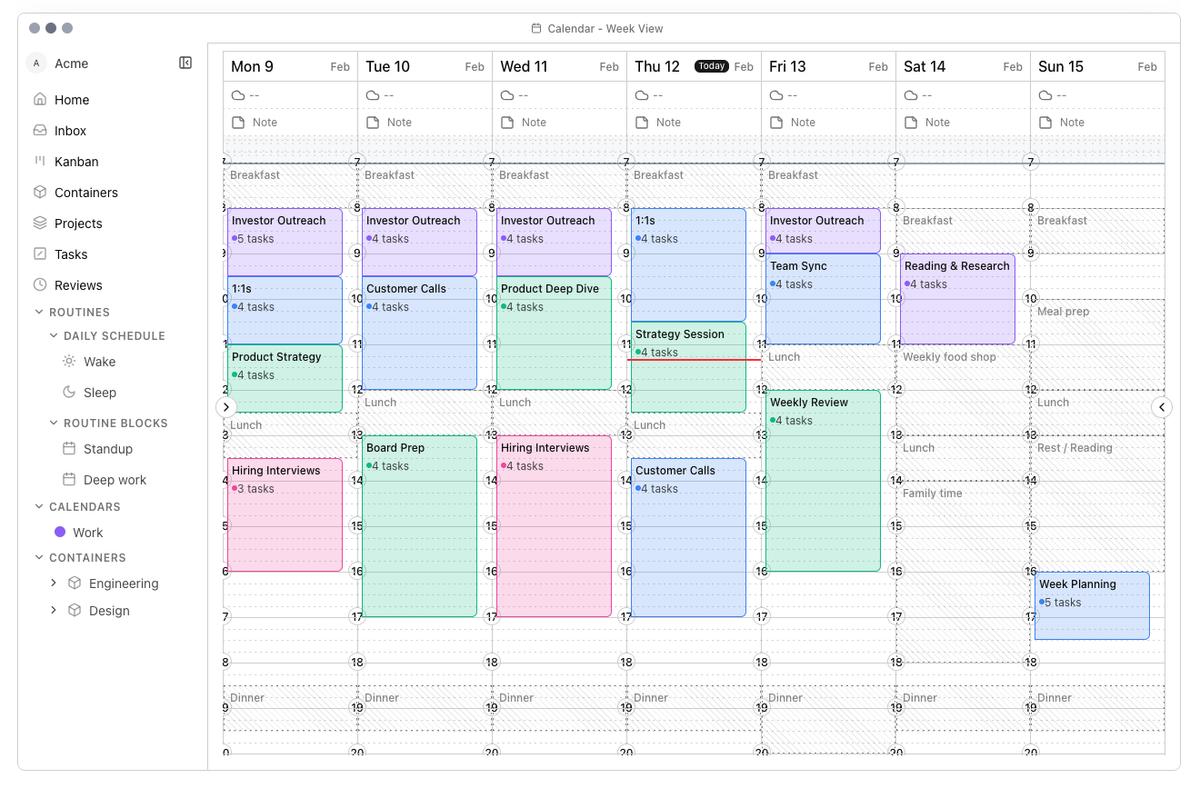
Changed
- Improved reviews — Daily, weekly, monthly, quarterly, and annual reviews pull context from connected tools for consolidated reflection in Reviews, to complete reviews faster with better context.
Introducing Pilfer
Pilfer is a lightweight purchasing planning system designed for startups and SMEs to log, prioritize, and evaluate purchases relative to company goals, resources, and past impact.
Most teams already spend money. The hard part is making spending decisions with shared context: links get dropped in chat, sourcing happens across a dozen tabs, decisions get made fast, and the reasoning disappears. A few months later, the team can’t easily trace what was considered, what was ruled out, or what would have changed the decision.
The beta brings purchase and sourcing decisions closer to company principles, projects, and goals. Every potential buy is treated as an investment—logged early, evaluated in context, and documented so sourcing knowledge and decision history compound over time. The outcome is simple: clearer decisions now, and smarter decisions later.
A shared planning view makes spending legible as a portfolio of bets: what’s being built, what already exists, what might be needed next, and what recurring costs are quietly shaping runway. The goal isn’t control. It’s clarity.
Update: Unified Mentions, Collaborate with Agents, and Threaded Conversations
This update introduces collaboration with agents directly inside comments for the first time and makes working with teammates feel more consistent and responsive. We’ve unified @-mention autocomplete across agents and teammates so you can trigger agent responses directly from comments, polished agent visuals and behavior, introduced threaded conversations with popouts, and added per-user, per-agent rate limits to keep things reliable at scale.
New Featuresv
- Color-coded agent avatars: Enhanced agent avatar rendering with color-coded backgrounds across comment panels and mention autocomplete, improving visual consistency in agent identification throughout the app.
- Unified @-mention autocomplete and triggers: A single, unified @-mention autocomplete experience for both agents and teammates. When you @-mention an agent in a comment, it now triggers an agent response in that thread.
- Dedicated autocomplete components: Introduced dedicated autocomplete components for agents and teammates, giving us a cleaner foundation for future enhancements to search and filtering.
- Agent thread popup: Added an agent thread popup to make it easier to focus on an agent’s responses and context without losing your place in the main view.
- Collaborators panel: New collaborators panel surfaces who is involved in a thread or project, including agents and human teammates, for better awareness.
- Agent avatar/image color picker: Color picker support for agent avatars and images, letting you customize agent identities for clearer visual scanning.
Improvementsv
- Threaded conversations: Improved threaded conversations with expandable threads and popouts so you can drill into specific discussions without cluttering the main context.
- Richer agent UI: Upgraded bot (agent) UI with an agent badge, clearer avatar/name presentation, and an explicit “I’m thinking…” state to better communicate activity.
- Snappier comments UX: More frequent recent-comments refresh and optimistic reply handling, making conversations feel much more responsive and real-time.
Limitsv
- Per-agent rate limiting: Added a per-user, per-agent rate limit of 10 requests per minute to keep the system stable and responsive under heavy usage.
Update: Private Are.na Channels Loading Fix
Fixed an issue where private Are.na channels you have access to would fail to load correctly inside projects and grids.
Bug Fixesv
- Private Are.na channels not loading: Fixed a bug where private channels you can access would not load in projects and grids, even when your Are.na account was connected.
Update: Improved Are.na Authorization Flow and Navigation
We've improved the authorization flow to reduce blocking by redirecting users back to their original page after are.na authorization. Added helpful links to API key providers on settings pages and improved navigation with an agents page link in the command launcher. Also fixed missing tooltips on version and column settings tools.
Improvementsv
- are.na authorization redirect: Now redirects back to original page where you clicked from, instead of settings to reduce blocking flow
- API key links: Added link to page to get API keys for providers on settings pages
- Agents page link: Added link to agents page on command launcher
Bug Fixesv
- Missing tooltips: Fixed missing tool tips on versions and column settings tools
Feature Release: Tools for Agents and Web Search
Agents can now be equipped with powerful tools to perform specific tasks including web searching, analysis, accessing domain-specific knowledge, and creating diagrams. We've integrated Exa and Firecrawl for web search capabilities, added a direct login button for faster access, and improved agent model configuration options.
Featuresv
- Tools for agents: Attach tools to agents that allow them to perform specific tasks including searching the web, performing analysis, accessing domain specific knowledge, creating diagrams and drawings, etc.
- Web search tool with Exa and Firecrawl: Integrated Exa and Firecrawl for web search capabilities in agent tools
Improvementsv
- Direct login button: Added direct login button for faster access
- Models for agents: Added configuration to allow specific AI models to be configured for agent and agent types
- Loading state on agents page: Fixed loading state on agents page in settings
Bug Fixesv
- Hotkeys clashing with browser hotkeys: Fixed bug on hotkeys clashing with browser hotkeys
Feature Release: Image Drag & Drop and Text Tool
Users can now drag and drop images directly into the grid to create blocks, making content creation faster and more intuitive. The new text tool on traces allows users to input, move, and rescale text elements. We've also improved the create block UI, decluttered the trace toolbar, and fixed several styling and hotkey issues.
Featuresv
- Drag and drop image to create block: Drag and drop an image directly into the grid to create a block
- Text tool on traces: Users can now input, move, and rescale text on traces
Improvementsv
- Create block UI: Fixed create block UI to make dropping URL and images easier
- Trace toolbar: Updated additional toolbar UI on trace live to declutter
- Rectangle border radius: Added option to toggle border radius for rectangles
- Default tool: Changed default tool on trace to select
Bug Fixesv
- About page styling: Updated about page styling to follow other docs pages
- Changelog header: Fixed changelog header bg and added theme toggle hotkey
- Hotkey clash: Fixed l hotkey clash (bug that meant hotkey clashed with browser hotkeys)
Improvements: Shape Selection and Transformation
Added support for transforming multiple selected shapes together with move and resize options. Enhanced marquee selection to include shapes fully contained within the selection area, and added visual resize handles and bounding indicators for grouped selections. Updated the color of the last saved indicator for better visibility.
Improvementsv
- Multi-shape transformation: Added support for transforming multiple selected shapes together with move and resize options
- Marquee selection: Enhanced marquee selection to include shapes fully contained within the selection area
- Visual indicators: Added visual resize handles and bounding indicators for grouped selections
Bug Fixesv
- Saved indicator: Updated the color of the last saved indicator
Improvements: Performance Settings and Chaos View Updates
Added a "Performance" section in project and channel management settings with a "Disable grid animations" toggle to improve performance. Settings automatically sync across browser tabs and windows. Chaos view now includes an auto-rotate toggle in settings that persists, defaults to enabled, and syncs across tabs and windows. Per-image rotate handles in Chaos view enable pointer-based manual rotation. Fixed accidental clicks triggering presentation mode immediately after rotating or dragging images.
Improvementsv
- Performance settings: Added a "Performance" section with a "Disable grid animations" toggle in project and channel management settings to improve performance
- Setting sync: Setting syncs automatically across browser tabs and windows
- Chaos auto-rotate: Chaos auto-rotate toggle added to settings; persists, defaults to enabled, and syncs across tabs/windows
- Per-image rotation: Per-image rotate handle in Chaos view for pointer-based manual rotation
Bug Fixesv
- Presentation mode: Prevent accidental clicks triggering presentation mode immediately after rotating or dragging images
- Toploader: Fixed missing toploader
- Dark mode: Added darkmode colours
- Comment blocks: Fixed bugs related to adding blocks to comments + accidental clicks
Feature Release: Block Creation and Grid Refresh
Users can now create blocks directly from Proximity by setting a default channel and uploading images, URLs, text, and other content. Created blocks are automatically added to both Proximity and Are.na. Added grid refresh functionality with a refresh button and Shift+R shortcut that invalidates queries, fetches with bypassCache, and revalidates project pages. New keyboard shortcuts include refresh (Shift+R) and add block (a), with updates to the settings and hotkeys panel. Enhanced error feedback provides clearer information when channel loading encounters errors.
Featuresv
- Block creation: Create a block directly from Proximity (users can set a default channel and can now upload image, URL, text etc. to create a block and add it directly to both Proximity and Are.na)
Improvementsv
- Grid refresh: Adds refresh button and Shift+R shortcut; invalidates queries, fetches with bypassCache, and calls revalidateProjectPage
- Hotkeys: Adds shortcuts for refresh (Shift+R) and add block (a); updates settings and hotkeys panel
- Error feedback: Enhanced error feedback when channel loading has errored out
Feature Release: Comment Attachments
Users can now upload, preview, and remove images and files in trace and project comments, enabling richer collaboration and context sharing. This release also fixes local grid loading errors and private channel rendering issues.
Featuresv
- Comment attachments: Upload, preview, and remove images/files in trace and project comments
Bug Fixesv
- Local grid loading: Fixed local grid loading errors
- Private channel rendering: Fixed private channel rendering
Bug Fixes
This release fixes bugs related to content display, layout responsiveness, and grid configuration. Special characters in image titles now render correctly, layout dynamically adapts to panel height adjustments for improved responsiveness, and column configuration can be changed on preview grids without issues.
Bug Fixesv
- Special characters: Fixed display of special characters in image titles
- Layout responsiveness: Improved layout responsiveness by dynamically adapting to panel height adjustments
- Column configuration: Fixed bug preventing changing column configuration on preview grids
Feature Release: Channel Creation and UI Updates
Users can now create a new Are.na channel directly while creating a project, streamlining the workflow for setting up new projects. Added a top progress indicator during page navigation to provide visual feedback, and redesigned the settings page layout with improved profile card display and navigation for better usability.
Featuresv
- Channel creation: Create a new Are.na channel whilst creating project
Improvementsv
- Progress indicator: Added top progress indicator during page navigation
- Settings page: Redesigned layout with improved profile card display and navigation
Improvements: Are.na Integration Improvements
Added informational UI prompts that guide users to connect their Are.na account via Settings. Toast notifications now alert users when private channels aren't accessible, and the app now supports accessing private Are.na channels when users are signed in and connected. Improved fallback behavior and error handling for rate-limited Are.na API requests provide a more reliable experience when working with Are.na data.
Improvementsv
- UI prompts: Added informational UI prompts guiding users to connect their Are.na account via Settings
- Toast notifications: Added toast notifications alerting users when private channels aren't accessible
- Private channel access: Added support for accessing private Are.na channels when user is signed in and connected
Bug Fixesv
- API error handling: Improved fallback behavior and error handling for rate-limited Are.na API requests
Improvements: Collaborators and UI Improvements
Added collaborators management with a modal that includes search, add, and remove functionality. Collaborator avatars now display in the action panel for quick visibility. Sort controls have been reorganized with expanded custom ordering options, and various button sizing and spacing adjustments improve UI consistency across the interface. Projects now automatically generate URL-friendly slugs based on project names, and navigation uses these slugs with intelligent fallbacks. Project settings now separately handle privacy level changes for improved reliability.
Improvementsv
- Collaborators management: Added modal with search, add, and remove functionality
- Collaborators display: Added avatar display in the action panel
- Sort controls: Reorganized with expanded custom ordering options
- UI consistency: Various button sizing and spacing adjustments
- Project settings: Separately handle privacy level changes for improved reliability
Bug Fixesv
- Project slugs: Projects now automatically generate URL-friendly slugs based on project names, enabling cleaner and more readable project URLs
- Project navigation: Improved to use generated slugs when available, with intelligent fallbacks
- Missing collaborators: Fixed issues with missing collaborators
- Hotkeys: Fixed hotkey-related bugs
- Preview links: Fixed preview linked channels links redirecting to broken URLs
Feature Release: Print Feature
Added print functionality to easily print out projects. Users can configure print settings including orientation (portrait or landscape), page layout (single-sided or double-sided), and control whether block titles and descriptions appear on the printout.
Featuresv
- Print feature: Print projects with customizable settings
- Orientation: Configure portrait or landscape orientation
- Page layout: Choose single-sided or double-sided printing
- Content options: Turn on/off titles and descriptions for blocks
Feature Release: Channel Preview
Users can now preview linked channels directly in Proximity before adding them to a project. When a block contains a linked channel, users can open and preview the channel's contents within Proximity to evaluate whether it fits their project before committing to add it. Channel clicks now open preview routes, and autosave intelligently switches between local and remote modes based on the current context.
Featuresv
- Channel preview: Open and preview linked channels on blocks in Proximity before adding them to the project
- Keyboard shortcuts: Shift+S to save a channel to a project, L to toggle Channel Management
Improvementsv
- Navigation: Channel clicks open preview routes
- Autosave: Smarter autosave switching between local and remote modes
- Styling: Minor spacing and hover styling tweaks across home CTA and lists for improved layout and feedback
Bug Fixesv
- Project saving: Fixed issues with saving projects locally
Feature Release: Column Settings and Sorting Improvements
Users now have full control over column layout with manual configuration from 1 to 50 columns or automatic sizing. These preferences persist across sessions, so layouts are automatically restored when returning to projects. Swap mode streamlines image reordering in custom sort view—press 'w' to quickly rearrange blocks.
Sorting has been enhanced with visual feedback, toast notifications, and new options to sort by "Channel" and "Connections". The image info UI now reveals all linked channels where a block appears, providing better context for cross-channel connections. Are.na channel inputs auto-save on blur, and project creation now uses separate quotas for public and private projects, giving users more flexibility in how they organize their work.
Featuresv
- Column settings control: Manual column count configuration (1-50) or automatic sizing
- Column layout persistence: Preferences persist and automatically restore across sessions
- Swap mode: Reorder images in custom sort view (activate with 'w' key)
Improvementsv
- Image info UI: Updated to show additional linked channels a block is found in
- Sorting feedback: Added visual feedback and toast notifications during sorting operations
- Sorting options: Added "Channel" and "Connections" as sorting options
- Auto-save: Are.na channel inputs now auto-save when losing focus
- Project creation: Enhanced with separate public and private project quotas
Feature Release: Traces and Channel Creation
Traces allows users to capture snapshots of their grid and annotate them with live tools. Users can draw freehand with the pen tool, add geometric shapes, overlay images, and attach comments directly on snapshots.
A new block selection tool enables creating projects from selected blocks. When creating a project, users can configure the name, slug, and privacy level (Public, Closed, or Private). Slugs are automatically generated from project names, and keyboard shortcuts streamline the workflow: press B to toggle selection mode and Enter to create a project. When saving projects created from blocks, corresponding Are.na channels are automatically created.
Featuresv
- Pen tool: Freehand drawing on snapshots
- Shape drawing: Geometric shapes for annotations
- Image overlay: Overlay images on snapshots
- Comments: Add comment annotations
- Block selection tool: Create projects from selected blocks
- Project creation: Configurable name, slug, and privacy levels (Public/Closed/Private)
- Automatic slug generation: Generate slugs from project names
- Keyboard shortcuts: B to toggle selection mode, Enter to create project
- Are.na channel creation: Automatically create channels when saving projects from blocks
Bug Fixesv
- Scroll propagation: Fixed unwanted scroll propagation in dialogs
Launching IRLProximity (Beta)
IRLProximity is a spatial research surface that turns Are.na blocks into programmable, multiplayer grids.
It sustains complexity instead of flattening it. Unlike "second brains" or productivity apps, it is a living interface where ideas are arranged in space, worked with in real time, and cultivated together. IRLProximity transforms collecting into shared memory and living arguments.
IRL Proximity is now available for general beta.
Featuresv
- Projects: Connect one or more Are.na channels to view in a grid or in chaos mode
- Are.na Sync: Connect your Are.na account to access private channels and import channels directly
- Presenter Mode: Quickly present and view blocks of a channel in the context of the whole project
- Custom Block Sorting: Sort blocks in projects by project, block name, date created, or colour